Showing posts with label Articles. Show all posts

Thursday, May 18, 2017

Home Remedies For hair Loss in Men

Home Remedies For hair Loss in Men

Stylish and healthy hair

Everybody wants strong and healthy hair but today's polluted environment spoil our health and also hair. Some people more worry about their hair fall which is a very common problem nowadays.
It is very usual in a day to fall 100 hairs, so no worry. Hair life is too short. Follow the below tips to protect your hair from pollution and make it stronger and healthy.

Meditation: Daily minimum 10 mins of meditation can reduce your hair fall problem, and it reduces the stress too.

Green Tea: maximum 2 cups a day can make your skin bright and your hair healthy,  Please don't take more than two cups a day.

Egg White: As everybody knows, Egg white is the best conditioner to hair and also make your hair healthy, apply the Egg white to hair and wash after 30 mins with light cold water. Hair requires the protein to grow strongly. It is suggested to eat an egg or other protein products(beans, Chicken, etc.)

Curd: for smooth and silky hair, the curd is an excellent choice. Apply to the hair for 30mins and wash with shampoo.

Badam Oil: badam oil massage is good to you scalp, just warm the badam oil and apply to hair. If you massage with badam oil that improves the blood circulation and hair grows healthy and strong.

Onion Juice: Onion contains sulfur.It helps to reduce hair fall and infection problems.Applying onion juice to the scalp will promote the blood circulation to the hair follicles.

Bottle gourd Juice: Applying Bottle gourd juice to hair at least half an hour will give good results.

Baking Soda Therapy: Make a Mix with two table teaspoons of baking soda with water.Apply this mix to the hair after the head bath.this will remove shampoo completely from your hair and will give healthy and shiny hair.
 
Cautions:

  • Always use the sulfate less shampoo while taking the head bath.
  • Head shower is suggestible per 3 days once
  • Don't use a comb on wet hair.
  • Don't use plastic comb on your hair, always use comb that made with wood or teeth made with nylon bristles
  • use cap or any other mask to your hair if your going outside this summer

Tuesday, May 09, 2017

Change Aadhaar Card Mobile If You Lost Sim card

Change Aadhaar Card Mobile If You Lost Sim card

Change Mobile Number for Aadhaar

There are two ways to change your registered mobile number of Aadhaar card.one is offline update and another one is online update.Online update will be done through Aadhaar official website with verifying your register mobile number.The offline update is nothing but sending update request through a postcard or visiting any authorized Aadhaar service center.

If you lost your mobile number activity to generate OTP, then it is recommended to visit any nearest Aadhaar service center.Update request through post will update all other information except your new mobile number.Follow below simple process to visit Aadhaar enrollment center.

Mobile Number Update At Aadhaar Seva Center

  • After clicking on above link, select your state, District/City, area/Locality from the page and click on search.
search aadhaar center

  • The website will fetch all nearest Aadhaar Seva centers from your provided address details.If you would like to search only permanent Aadhaar center details, then check the checkbox with name "only permanent Aadhaar centers" option.
  • Visit Aadhaar center and fill and submit a form with new updating details.The updating process will take maximum one week time to get an update on a new card.
  • This Aadhaar Update/Correction Request will be accepeted at any Aadhaar Seva center regardless of your state/district.
  • There is no charges for Aadhaar details update.you can update your Aadhaar information details at any center entire indi and .this is a free service.

Friday, May 05, 2017

Process For Aadhaar Card Details Update or Correction

Process For Aadhaar Card Details Update or Correction

Aadhaar Card update or correction

The Aadhaar card is a unique identity card for the Indians which is mandatory to get the benefit of all the Indian government schemes. Aadhaar card is necessary to apply for a passport, to open a new bank account, for a monthly pension, etc.
It is recommended to have  Your Aadhaar card details are always should be up to date.If you'are changed your house address other than existed in your Aadhaar card, then you can apply for change my address request on Aadhaar card.
There are two ways to apply for Aadhaar card correction or details modify request.

Aadhaar Card Address Change/Correction Process Through Online

Note: Registered mobile number is necessary to complete this online Aadhaar correction.
  1. This Online Process is the easiest way to change or correct Aadhaar card details in online.Just log in to the official website https://ssup.uidai.gov.in/web/guest/ssup-home
  2. Open the above link and click on Click Here link which is at the bottom of the page.This link will redirect you to the Aadhaar Self Service Portal.
  3. In this portal screen, first of all, you need to enter your 12 digit Aadhaar card number and enter verification captcha code in the text box and click on send OTP button.Within few minutes you will get your unique verification code to your registered mobile number through SMS service.
  4. After entering the correct one-time password, a new window will be opened with all your details which were given by you at the time of Register.
  5. Now you can edit any of your details which are displaying on screen and click on submit update Request after the entering the new details on screen
  6. You will be asked again to review your registered details before proceeding to the next.If you think all your details are correct, then click on Proceed or if you want to change details again then click on modify button.
  7. Date of birth proof and any of your identity proof scan copies are to be uploaded to update/correct your Aadhaar existing details.
  8. The final step is to choose any of one BPO provider for update request and click on Submit button for URN (Update Request Number).
  9. This URN is used for tracking status of the update request.this is also useful for downloading updated Aadhaar card from online.

Aadhaar Card Address Change/Correction Through Post

if you lost or not using an old mobile number which is used for Aadhaar registration, then it is not possible to update/correct your data through online.Online update will be possible only with the registered mobile number only.
You can approach through post letter for Aadhaar card update request if you do not have your registered mobile number. 
Download the Aadhaar Update request form with updated data and post it to the below Aadhaar  Office address.

Addresses For sending Update Request By Post:

 UIDAI,
Post Box No. 10,
Chhindwara, Madhya Pradesh-480001, India

(or)

UIDAI,
Post Box No. 99, Banjara Hills, Hyderabad-500034,
India
                                   
                                          Download Aadhaar Update Request Form 

Wednesday, May 03, 2017

Tuesday, May 02, 2017

20 Best and Latest WhatsApp Tricks 2017

20 Best and Latest WhatsApp Tricks 2017

whatsApp tricks latest

Whats App Pin Chat

whats app newly introduced pin chat feature that will allow users to pin their favorite chat to top on their chat screen.currently, this feature is only available in beta version only.

WhatsApp  Live Status

WhatsApp introduced live status feature instead of old text status.this feature allows users to set images or videos as their status.this option lets the user see who watched their status also. 

Two Step Verification

this is two-factor authentication it saves your information and personal data from others if you lost your phone.user need to set 6 digit passcode while activating this feature.by enabling this user can activate his account anywhere and on any device.user can reset their 6 digit password through an email account.

Replying to Group Messages

whats app allows creating a group with up to 250 members.if you wants to reply to a particular message in the group, long press that message and click on the left turned arrow and give a reply.

Who Read your Message in Group

in one to one chat you can see blue ticks if your friend read your message.but in whats app group, there are no blue ticks.but we can see who are read your message by long pressing your message and click on 'i' option at the top.

Listening Voice Messages Secretly

what app introduced a new feature for voice messages.if you wanna listen to some personal voice message secretly, just place your phone near to your ear.it will reduce music sound and plays with front speaker.

Font Styles

you can send what's app messages with bold and italic style text effects.by placing your message between * symbols, your message will be changed to bold text.placing your text between underscores( _ ) will give you Italian text effect.sending your text between "*_" will give you bold italic text.

Send one Message to Multiples At a Time

we can send a message to multiple contacts at a time without any groups.click on your whats app menu and choose Broadcast option.it will show your contacts to select whom to send.after choosing your contact, just write your message and click on send.that will be sent to all your contacts which you selected.

Mute Chats and Groups

if you'are not interested or irritated with whats app group messages then put it on mute option.it won't give you any notification or alert for new messages in that group.you can make it unmute if you want.

Stop Auto Downloading Media

you can find the option in Settings > Chats and calls  > Media auto-download.if you disabled this, any of your WhatsApp media will not be downloaded automatically.you can download any of your media files by click on it manually.tou can enable or disable this option anytime.

Share Documents

whats app allows users to send documents also.user can send pdf, excel, word documents through whats app.

Home Screen Shortcut

the user can create a shortcut for their favorite chat.this feature helps the user to open their saved chats directly.user can add their chat shortcut to his mobile home screen.

WhatsApp Web

this feature allows the user to access his whats app account on the computer.go to whats app and choose option whats app web in menu section.it will opens camera to scan whats app web QR code.open www.whatsappweb.com on your computer to pair devices.

Self Messaging

this simple trick allows you to send a message yourself.open your whats app and click on create a group.choose any two friends and delete them immediately.now you're the only member of that group.in this group, you can send messages yourself.

Send Files from Mobile to Computer

create any dummy group in whats app and make sure are the only member in that.now you can send any files to that group and download them through whats app web to download on the computer.

Making International Calls

whats app allows their users to make international calls with free of cost.there is additional charges for voice and video calls.

Mark As UnRead

if you want to read one message but suddenly you got some urgent work.then you can make that message as unread to remember.long press on that message and choose option Mark as Unread.

Backup To Google Drive

if your phone storage is full or you want your conversation backup file.then you can backup your message in google drive.

Search in Group

if you're a member in one whats app group which is had a large number of people.now you can simply search for any message with newly introduced search option in whats app groups.

Saturday, March 11, 2017

Natural Weight Loss More than 20 Kgs in Three Months

Natural Weight Loss More than 20 Kgs in Three Months

Natural weight loss in three months

When you are working on weight loss, then it can help to get motivated by the people who have lost excess weight.

What changes did you make to your diet?
I stopped carbohydrates (rice) completely and ate only vegetables, boiled eggs, chicken, fish, and fruits. My Mother was a big source of support, as she would cook the vegetables separately for me. While cutting down on oil, sugar, and salt, eating bland food was not a problem because I use a small amount of spice in the food. I do not crave unhealthy food because I allow myself a small portion once in a while. My diet is entirely natural and I do not take any supplements. I did not want to have any severe food restrictions, because it may become difficult later on, to continue the same plan.

What exercises did you take up?
I started working out for at least one hour daily in the morning, and now, my exercise routine is a minimum of 1.5 hours a day at home. I focus on cardio (walking, jogging, and running) and do the plank exercise as an added benefit.

How do you stick to your diet during team outings?
During team outings, I try to eat the healthiest foods, such as salads and vegetables, and less of the unhealthy items. In the office, I drink water as often as possible.

What are your future goals?
Now that I have lost as much weight as I want, I am now aiming towards fitness, by following the same workout and diet routine for the next three months.

At a glance – changes in food and exercise

food diet plan for weight loss

Friday, January 27, 2017

How to Get Duplicate for any ID card if you lost

How to Get Duplicate for any ID card if you lost


The card is part of today's lifestyle. So, we do have all the types of cards in our wallet. If you lost your wallet that having the Credit card, debit card, voter id, pan card, etc. don't panic, there is the way to get the copy of your cards. Here we go for the process.

Vote ID card:
Voter ID is multi-purpose, it is not only used for the vote and also consider as address proof and sometimes used as birth date evidence. If you lost your Voter ID, just go to mee-seva which is nearest and submit you Xerox copy or give your voter id number and polling booth number along with Rs.10 charge. You can also get it from MRO office with free of cost by applying based on your card number. For more information, visit www.ceoandhra.nic.in
PAN card:
PAN card is most essential in financial transactions, it is mandatory for IT employees, but nowadays it is necessary for any financial transaction as per central govt new policies. If you lost your PAN(Permanent Account Number), it is very easy to get it by applying to two photos, ID proof&address proof on the site by paying the Rs.90 but it takes three weeks to get the new one. For more information, visit www.nsdl.pan

Driving license:
As we are crazy about driving, we must have a Driving license in our wallet. If we lost the driving license, we need to register the complaint in the police station and get the non-traced form to apply the new one in RTO office and also need document the details of lost in Rs.10 bond paper.It may take 1 month to get the new one. For more information, visit aptransport.org

Ration card:
Ration card is not only used for a subsidy which Govt. of state providing and also used like ID of the whole family.  If we lost this, need to login www.icfs2.ap.gov.in with username: guest, password: guest123 and search for the copy with the card number. Print this copy and submit in AP online center, MRO provides new one after MRO verification and may charge but very low.

ATM Card/Credit Card:
This is most important as it is a matter of money. If you lost the ATM card/credit card, need to inform bank to block the card and raise a request for a new card by calling customer care. For a new card, bank charges some amount based on the bank and card type. Once verified the details bank issue the new card.
Passport:
If you lost the passport, need to a complaint in the police station and get the non-traced certificates/form. Take a DD in the name of 'passport office, Hyderabad' and need to apply by attaching the non-traced form.It takes 3 months to complete the verification process and issues the new passport. In the case of the tatkal passport, need to directly contact the district SP, for information, visit www.passportindia.gov.in.

Aadhar card:
In case loss of aadhaar, raise a complaint by calling the toll free number 18001801947. The new one will be issued without any charge by sending through the post. For more information, visit help@uidai.gov.in
.
Scanning all ID proofs and keeping in your mail or some secure drive is good practice, instead of searching for the Xerox copies.

How to know the Expiry date of gas cylinder

How to know the Expiry date of gas cylinder

How to know the Expiry date of gas cylinder

Every Gas cylinder has an expiry date, and it is very easy to identify. Find these details on the top of the cylinder metal plates. For example, if the cylinder has A 17 then it falls under January to March 2017. That means cylinder will have expiry in the first quarter. Cylinder should have a security check after the March as per our example

Below is the codes of expiry dates:
A 17   -January- March, 17 is the year 2017
B 17   -April -June 2017
C 17   -July- September 2017
D 17   -October- December 2017

What if expiry date exceeds:

If cylinder exceeds the expiry date, that cylinder should not use. You have right to reject and demand the new one. The dealer has to submit that cylinder to filling station. The dealer has 3 months of grace period after expiry date to submit to the filling station.

Watch Demo Video


Customer care numbers
For indane gas- 18002333555 which is toll-free. You can call and ask you queries or give you complaints.
If HP gas, 9666023456 (for Telugu states (AP& Telangana))

For all Gas customer, you can get emergency services by calling 1906 which is introduced in January 2016 by central govt, and it is toll-free for 24x7.
How to Choose the best Camera When Buying a Smartphone

How to Choose the best Camera When Buying a Smartphone

best Camera phone

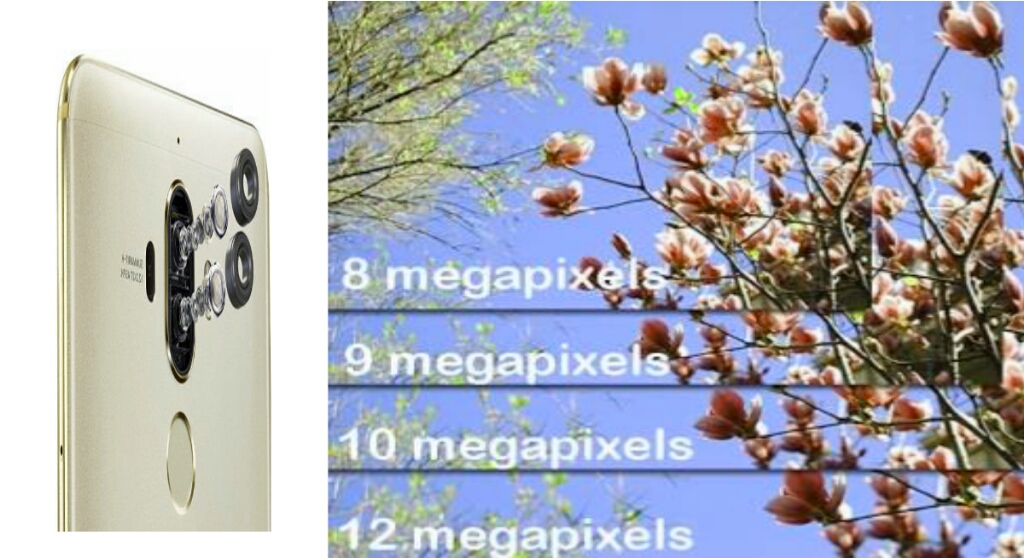
Do More Megapixels means better Camera?

Megapixel used to enlarge the size of the image. If more Megapixel, It doesn't mean megapixel alone enough to take good picture.Camera sensor, lens quality, aperture rate& shutter etc affect the image quality.Capture image should not break up as pixel if you zoom the image and camera should capture natural colors. even 8 megapixels can capture the good image if it has quality lenses and high aperture rate than 13 megapixel camera with low-quality lens and low aperture rate.

Camera Sensor Size

best Camera phone
Based on the camera sensor, we can capture good images& videos.if camera sensor has wide angle then it takes the more light to produce the picture.this is very important to take the picture in low light.BIS sensor has capable take the high-quality pictures in low light.if camera having the 'Exmor R' or' Sony IMX' censor are good to take the pictures.

Aperture size

best Camera phone
Another important thing to notice while buying the smartphone is Aperture length. Aperture is small hole behind the camera lenses which used to focus the light on camera sensors. Aperture length indicates as 'f' which means focal. for examples, f/2.0, f/2.2.. etc. the number after '/' should be low. here f2.0 is good focal length than f/2.2.

What is Megapixels?

best Camera phone
megapixel means millions of pixels.if you say 13MP, it means 13 million pixels. image can be enlarged based on megapixel but focal length and camera lens are more important to produce clear and quality image.


Back Dual Cameras/Dual Camera Lens

best Camera phone
back dual lens camera and dual camera, both are same which means two cameras working to gather to capture the image.this camera capable of the take images like DSLR camera. one who interest in taking the picture can have this type of mobile. dual lenses focus on single image at a time with their different focal lengths. Image focus can change even after took the picture in dual lens camera.

Lens Quality

best Camera phone
Quality lens has allows the good light to focus on image. Carl Zeiss lenses are good lens and available in high end mobiles to mid budget mobiles also.


Dual LED Flash

best Camera phone
every smart mobile having the flash that can be used if low light but flash produces the some kind of white light but natural colors are not captured in image.In dual flash,one flash produce the white light another one produce the mixed red color which produce the light like a day. some mobile uses the Xenon flash, this flash more powerful that means 1000times more light compared to normal flash.

Wide Angle Lens

Lens with short focal length.means lens having capability to take photos from short distance.this is useful to take photos in a small room or closeup photos.

HDR mode recommended

best Camera phone
High Dynamic Range or HDR mode is one of the Camera modes.it lets you see more quality in your photos by expanding the range of exposure . in this mode you can get clear photos without losing any details even in dark areas.this mode takes multiple photos with different exposure values and combine them as single photo.


Optical image stabilization(OIS)

Optical Image Stabilization (OIS) which gives less blurry images and quality videos.It gives perfect photos even camera got moved or got shake. OSI mainly to eliminates camera shake and to reducing blur.

Auto Focus (AF)

best Camera phone
Autofocus is focusing object in the picture.Nowadays this is common feature in all smartphones. It helps improve the quality of the photos we take.with is mode you can focus particular area from the picture and remain will be auto blurred.


Smile Detection

this option takes photos automatically by just detecting our smile.no button capture required.if it takes photos if detect any one smiley face on camera range

Video Quality

check video quality of the phone.some companies gives 13 megapixels but not with full HD recording.full HD recording will gives you high quality videos.

2017 - Best Smart Phones Under 20000 in India 

Lenovo Z2 Plus - ₹17499
Samsung Galaxy  - J7 Prime -₹16900
LeEco Le Max 2  - ₹17999
Gionee S6s  - 15999
OnePlus 2  - ₹19999
Xiaomi Redmi Note 3 -  ₹9999
Motorola Moto G4 Plus ₹12499
Lenovo K6 Power  - ₹9999